Virtual Account
Metode Bank Transfer merupakan metode pembayaran dengan cara transfer ke salah satu nomor virtual account yang telah disediakan. Untuk saat ini kami menyediakan tiga virtual account yaitu BCA, Mandiri, dan BNI. Disarankan untuk tidak melakukan transfer beda bank, apabila anda tidak memiliki rekening dengan bank yang sama dengan virtual acccount yang telah disediakan diharapkan untuk memilih metode pembayaran yang lain. Terdapat dua penyedia jasa virtual account, yaitu Midtrans dan Xendit/PT Sinar Digital Terdepan.
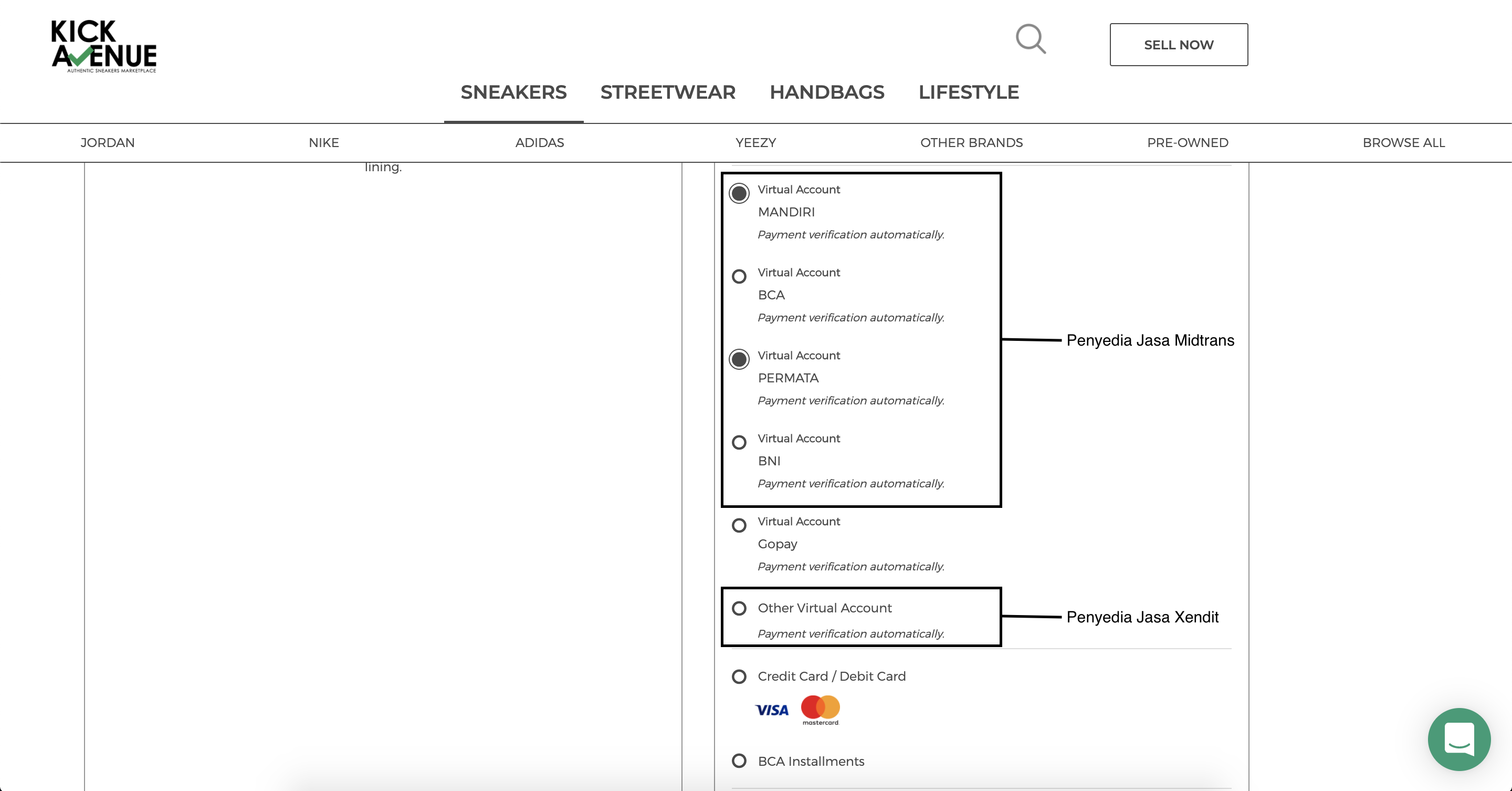
Berikut panduan membayar dengan menggunakan metode virtual account:
Penyedia jasa Midtrans (Kode Perusahaan: 70012)
BCA
ATM BCA
- On the main menu, choose "Other Transaction"
- Choose "Transfer"
- Choose "Transfer To BCA Virtual Account"
- Enter your "Payment Code" (11 digits code) and press "Correct"
- Enter the full amount to be paid and press "Correct"
- Your payment details will appear on the payment confirmation page. If the information is correct press "Yes"
Klik BCA
- Choose Menu "Fund Transfer"
- Choose "Transfer To BCA Virtual Account"
- "Input BCA Virtual Account Number" or "Choose from Transfer list" and click "Continue"
- Amount to be paid, account number and Merchant name will appear on the payment confirmation page, if the information is right click "Continue"
- Get your BCA token and input KEYBCA Response "APPLI 1" and click "Submit"
- Your Transaction is Done
m-BCA
- Log in to your "BCA Mobile" app
- Choose "m-BCA", then input your "m-BCA access code"
- Choose "m-Transfer", then choose BCA Virtual Account
- Input Virtual Account Number or choose an existing account from "Daftar Transfer"
- Input the payable amount
- Input your m-BCA pin
- Payment is finished. Save the notification as your payment receipt
Mandiri
ATM Mandiri
- On the main menu, choose "Pay/Buy"
- Choose "Others"
- Choose "Multi Payment"
- Enter 70012 (Midtrans company code) and press "Correct"
- Enter your Payment Code and press "Correct"
- Your payment details will appear on the payment confirmation page. If the information is correct press "Yes"
Internet Banking
- Login to Mandiri Internet Banking https://ibank.bankmandiri.co.id/
- From the main menu choose "Payment", then choose "Multi Payment"
- Select your account in From Account, then in Billing Name select Midtrans
- Enter the Payment Code and you will receive your payment details
- Confirm your payment using your Mandiri Token
BNI
ATM BNI
- On the main menu, choose "Others"
- Choose "Transfer"
- Choose "Savings Account"
- Choose "To BNI Account"
- Enter the payment account number and press "Yes"
- Enter the full amount to be paid. If the amount entered is not the same as the invoiced amount, the transaction will be declined
- Amount to be paid, account number, and merchant name will appear on the payment confirmation page. If the information is correct, press Yes
- You are done
Internet Banking
- Go to https://ibank.bni.co.id and then click "Login"
- Continue login with your User ID and Password
- Click "Transfer" and then "Add Favorite Account" and choose "Antar Rekening BNI"
- Enter account name, account number, and email and then click "Continue"
- Input the Authentification Code from your token and then click "Continue"
- Back to main menu and select "Transfer" and then "Transfer Antar Rekening BNI"
- Pick the account that you just created in the previous step as Rekening Tujuan and fill in the rest before clicking "Continue"
- Check whether the details are correct, if they are, please input the Authentification Code and click "Continue" and you are done
Mobile Banking
- Open the BNI Mobile Banking app and login
- Choose menu "Transfer"
- Choose menu "Virtual Account Billing"
- Choose the bank account you want to use
- Enter the 16 digits virtual account number
- The billing information will appear on the payment validation page
- If the information is correct, enter your password to proceed the payment
- Your transaction will be processed
Penyedia jasa Xendit/PT Sinar Digital Terdepan (Kode Perusahaan: 88464)
BCA
Melalui ATM
- Masukkan kartu ATM dan PIN BCA Anda
- Di Menu utama, pilih "Transaksi Lainnya". Pilih "Transfer". Pilih "Ke BCA Virtual Account"
- Masukkan nomor Virtual Account 02xxx xxxx xx
- Pastikan data virtual account Anda benar, kemudian masukkan angka yang perlu Anda bayarkan, kemudian pilih "BENAR"
- Cek & perhatikan konfirmasi pembayaran dari layar ATM, jika sudah benar pilih "YA", atau pilih "TIDAK" jika data di layar masih salah
- Transaksi Anda sudah selesai. Pilih "TIDAK" untuk tidak melanjutkan transaksi lain
- Setelah transaksi pembayaran Anda selesai, invoice ini akan diperbarui secara otomatis. Ini bisa memakan waktu hingga 5 menit.
Melalui Online
- Login ke KlikBCA Individual
- Pilih "Transfer", kemudian pilih "Transfer ke BCA Virtual Account"
- Masukkan nomor Virtual Account 02xxx xxxx xx
- Pilih "Lanjutkan" untuk melanjutkan pembayaran
- Masukkan "RESPON KEYBCA APPLI 1" yang muncul pada Token BCA Anda, lalu klik tombol "Kirim"
- Transaksi Anda sudah selesai
- Setelah transaksi pembayaran Anda selesai, invoice ini akan diperbarui secara otomatis. Ini bisa memakan waktu hingga 5 menit.
Melalui mBanking
- Buka Aplikasi BCA Mobile
- Pilih "m-BCA", kemudian pilih "m-Transfer"
- Pilih "BCA Virtual Account"
- Masukkan nomor Virtual Account 02xxx xxxx xx, lalu pilih "OK"
- Klik tombol "SEND" yang berada di sudut kanan atas aplikasi untuk melakukan transfer
- Klik "OK" untuk melanjutkan pembayaran
- Masukkan PIN Anda untuk meng-otorisasi transaksi
- Setelah transaksi pembayaran Anda selesai, invoice ini akan diperbarui secara otomatis. Ini bisa memakan waktu hingga 5 menit.
Mandiri
Melalui ATM
- Masukkan kartu ATM dan pilih "Bahasa Indonesia"
- Ketik nomor PIN kartu ATM
- Pilih menu BAYAR/BELI, kemudian pilih menu MULTI PAYMENT
- Ketik kode perusahaan, yaitu "88464" (PT SINAR DIGITAL TERDEPAN), tekan "BENAR"
- Masukkan nomor Virtual Account 88464 xxxx xx
- Isi NOMINAL, kemudian tekan "BENAR"
- Muncul konfirmasi data customer. Pilih Nomor 1 sesuai tagihan yang akan dibayar, kemudian tekan "YA"
- Muncul konfirmasi pembayaran. Tekan "YA" untuk melakukan pembayaran
- Bukti pembayaran dalam bentuk struk agar disimpan sebagai bukti pembayaran yang sah dari Bank Mandiri
- Transaksi Anda sudah selesai
- Setelah transaksi pembayaran Anda selesai, invoice ini akan diperbarui secara otomatis. Ini bisa memakan waktu hingga 5 menit.
Melalui Online
- Kunjungi website Mandiri Internet Banking dengan alamat https://ib.bankmandiri.co.id/
- Login dengan memasukkan USER ID dan PIN
- Masuk ke halaman Beranda, lalu pilih "Bayar"
- Pilih "Multi Payment"
- Pilih "No Rekening Anda"
- Pilih Penyedia Jasa "PT SINAR DIGITAL TERDEPAN"
- Pilih "No Virtual Account"
- Masukkan nomor Virtual Account 88464 xxxx xx
- Masuk ke halaman konfirmasi 1
- Apabila benar/sesuai, klik tombol tagihan TOTAL, kemudian klik "Lanjutkan"
- Masuk ke halaman konfirmasi 2
- Masukkan Challenge Code yang dikirimkan ke Token Internet Banking Anda, kemudian klik "Kirim"
- Masuk ke halaman konfirmasi pembayaran telah selesai
- Setelah transaksi pembayaran Anda selesai, invoice ini akan diperbarui secara otomatis. Ini bisa memakan waktu hingga 5 menit.
BNI
ATM BNI
- Select "Other Transaction"
- Select "Transfer"
- Select the type of account you are using to transfer (i.e. from Savings account)
- Choose "Virtual Account Billing"
- Enter virtual account number
- The amount billed will show on the screen
- Confirm the transaction, if it's correct then continue
- Your transaction is completed
- Once the payment transaction is completed, this invoice will be updated automatically. This may take up to 5 minute
Internet Banking
- Enter the following address https://ibank.bni.co.id and click "Enter"
- Enter your User ID and Password
- Select the menu "Transfer"
- Select the menu "Virtual Account Billing"
- Enter your Virtual Account number
- Choose the type of account you are using to transfer and press "Continue"
- The amount billed will show on the screen
- Enter the authentication token code
- Your transaction is completed
- Once the payment transaction is completed, this invoice will be updated automatically. This may take up to 5 minute
Mobile Banking
- Enter your User ID and Password
- Select the menu "Transfer"
- Select the menu "Virtual Account Billing" and then choose debit account
- Enter your Virtual Account Number on the menu "Input New"
- The amount billed will show on the screen
- Confirm the transaction and enter your password
- Your transaction is completed
- Once the payment transaction is completed, this invoice will be updated automatically. This may take up to 5 minute